
Effective senior care isn’t about finding one magic device; it’s about building a personalized ‘Ecosystem of Independence’ that addresses interconnected sensory and safety needs.
- Technology choices must prioritize user dignity and phased adoption over just features.
- A holistic approach integrates solutions for hearing, medication safety, and fall detection to support overall well-being.
Recommendation: Shift the focus from solving a single problem (e.g., low vision) to designing a comprehensive support system tailored to the individual’s evolving needs.
The journey of aging often brings a gradual erosion of independence, a process felt most acutely when simple tasks like reading a prescription bottle or hearing a television show become daily challenges. For many seniors and their families, the first step into assistive technology is a magnifying glass. While useful, this single-function tool barely scratches the surface of what’s possible and often fails to address the complex, interconnected nature of sensory decline. The frustration isn’t just about vision; it’s about the cumulative cognitive load of straining to hear, the anxiety of medication errors, and the fear of a fall going unnoticed.
The conventional approach of tackling each issue in isolation misses a crucial point. But what if the true key to restoring autonomy wasn’t finding a better gadget for each problem, but rather designing a holistic, personalized support system? This is the principle of the Ecosystem of Independence: a thoughtfully curated collection of technologies that work in synergy to support not just one sense, but the person as a whole. It’s a shift from reactive problem-solving to proactive life design, where technology serves dignity, safety, and connection.
This guide moves beyond the magnifying glass to explore how to build that very ecosystem. We will dissect the strategic choices between different technologies for hearing, medication management, personal safety, and home comfort. By understanding the underlying principles and trade-offs, you can architect a system that truly empowers independent living, adapting and growing with the user’s needs.
To navigate this landscape of innovative solutions, this article is structured to compare and clarify the best options available. The following summary provides a direct path to each critical area of this technological ecosystem.
Summary: A Guide to Assistive Technology Choices
- Soundbars vs Hearing Loops: Which Clarifies Dialogue Better?
- How to Use Smart Dispensers to Prevent Double-Dosing?
- The Risk of Getting Lost: GPS Trackers for Early Dementia
- AI Camera vs Wearable Pendant: Which Fall Detector Is More Reliable?
- Tablets or E-Readers: Which Is Easier on Aging Eyes?
- Why Catching Glaucoma Early Saves Vision in 95% of Senior Cases?
- Weighted Cutlery or Universal Cuffs: Which Helps Tremors Best?
- How to Automate Home Temperature Control to Prevent Hypothermia?
Soundbars vs Hearing Loops: Which Clarifies Dialogue Better?
Difficulty hearing television dialogue is more than an annoyance; it’s a significant contributor to social isolation and cognitive fatigue. The first step in building an auditory support system involves understanding the two primary technologies: environmental amplification (soundbars) and direct-to-ear systems (hearing loops). A soundbar enhances audio for everyone in the room, while a hearing loop delivers sound directly to a user’s telecoil-equipped hearing aid, cutting out ambient noise.
The choice is not about which is “better,” but which is right for the specific environment and user. Soundbars are a simple, plug-and-play solution ideal for shared viewing experiences. In contrast, hearing loops offer unparalleled clarity for the individual user, making them a superior choice in public venues and for those with significant hearing loss who need to eliminate background noise. The future trend towards Bluetooth LE Audio and Auracast may one day bridge this gap, but for now, the decision rests on a clear trade-off between communal accessibility and personalized clarity.
This comparative table breaks down the core differences to guide your selection for a home or public setting.
| Feature | Soundbars | Hearing Loops |
|---|---|---|
| Environment | Home-centric (TV, music) | Public spaces (theaters, churches) |
| Installation | Plug-and-play | Professional installation required |
| Audio Delivery | Environmental amplification | Direct-to-ear via telecoil |
| Coverage | Room-wide | Loop perimeter only |
| Cost Range | $100-$1,500 | $2,000-$10,000+ |
| User Requirements | None | Hearing aid with active telecoil |
Ultimately, a hybrid strategy often provides the best of both worlds, creating a versatile auditory ecosystem. A soundbar serves the household, while a personal neck loop or telecoil activation provides a private, high-fidelity listening experience when needed.
How to Use Smart Dispensers to Prevent Double-Dosing?
Medication adherence is a cornerstone of senior health, yet low vision and memory lapses can make it a high-stakes daily challenge. Smart dispensers move beyond simple pillboxes by automating the process with locked compartments, alarms, and caregiver notifications. Their primary function is to prevent both missed doses and dangerous double-dosing, a common risk with complex medication schedules. These devices transform medication management from a memory-based task to a secure, automated routine, forming a critical safety layer in the independence ecosystem.
The true value of these devices is their ability to provide peace of mind for both the user and their family. Integrating this technology isn’t just about buying a device; it’s about a careful onboarding process that builds trust and competence. The tactile interaction, as seen below, becomes a reassuring daily ritual rather than a confusing chore. Studies confirm the positive impact, as rehabilitation centers report a 20% improvement in quality-of-life scores with technology-based medication management.
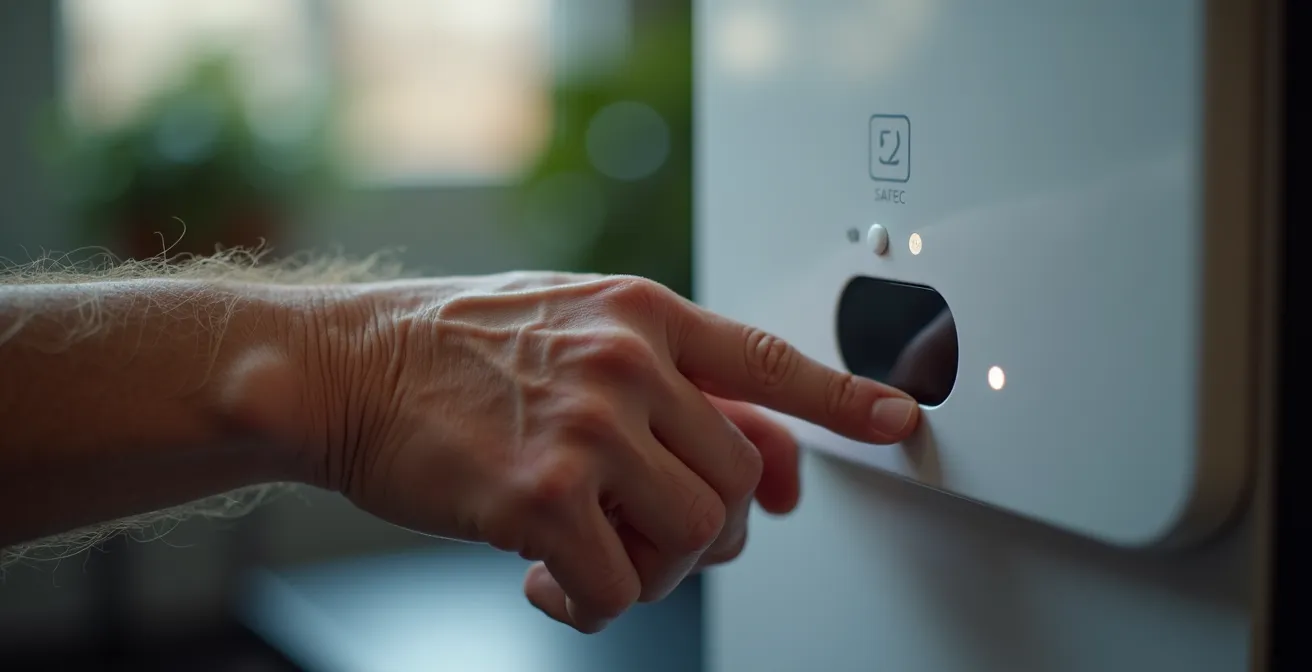
Successful adoption requires a gradual, supportive introduction. Rushing the process can lead to rejection of the technology. A phased approach, where the user gains familiarity and confidence over several weeks, is essential for long-term success and is a key principle of phased integration.
Your Action Plan: The Smart Dispenser Onboarding Protocol
- Week 1: Place dispenser next to existing pillbox, run both systems in parallel to build familiarity.
- Week 2: Let the user fill dispenser compartments themselves under supervision to foster ownership.
- Week 3: Demonstrate alarm features and practice responding to notifications to build confidence.
- Week 4: Set up family member or caregiver notifications for missed doses to create a safety net.
- Week 5: Create and clearly label a backup plan with an emergency pillbox for travel or power outages.
By automating this crucial daily task, a smart dispenser frees up cognitive resources and reduces anxiety, directly contributing to a more resilient and independent lifestyle.
The Risk of Getting Lost: GPS Trackers for Early Dementia
For seniors, especially those in the early stages of dementia, the freedom of a daily walk can be fraught with the risk of disorientation and getting lost. GPS trackers—available as watches, pendants, or even shoe insoles—offer a technological safety net. However, their introduction touches on sensitive issues of privacy, trust, and autonomy. The goal is not to “track” a person, but to extend their radius of safe independence. This requires a collaborative approach, where the device is seen as a tool for empowerment, not surveillance.
The most effective strategies are built on mutual agreement and respect for dignity. Furthermore, technology must adapt to the user’s changing needs and environment. For instance, industry research indicates that 65% of seniors in rural areas face GPS accuracy issues, often requiring devices that blend GPS with cellular and Wi-Fi location technologies for reliability. A one-size-fits-all approach is destined to fail; the solution must be as individual as the person using it.
Case Study: The Multi-Stage Tracker Implementation Strategy
Research highlights a “phased integration” approach to GPS tracking that respects evolving needs. In the early stage, user-chosen smart watches maintain dignity while providing location services on demand. As cognitive awareness declines in the mid-stage, the focus shifts to passive devices like shoe insoles or sewn-in tags that don’t require user interaction. Finally, in the late stage, as mobility decreases but wandering risk can peak, the ecosystem evolves to in-home motion sensors and door alarms, shifting the focus from outdoor to indoor safety. This progression respects autonomy while adapting to the reality of the condition, as a staged approach is proven to work best.
Initiating a conversation about a GPS device is often the biggest hurdle. Using a collaborative framework that centers on shared concerns for safety and a desire to preserve independence can make all the difference, transforming a difficult topic into a joint problem-solving exercise.
By framing the GPS tracker as a tool that enables continued enjoyment of cherished activities like walking, it becomes a partner in maintaining lifestyle, not a symbol of lost freedom.
AI Camera vs Wearable Pendant: Which Fall Detector Is More Reliable?
Falls are a leading cause of injury and loss of independence among seniors. Fall detection technology has evolved from wearable pendants to sophisticated, passive AI camera systems. Choosing between them involves a critical trade-off between privacy and compliance. A wearable pendant is private, activating only upon a detected fall, but its effectiveness is zero if the user forgets or refuses to wear it—a common issue.
In contrast, an AI camera system offers 24/7 coverage without requiring the user to wear anything. These systems use artificial intelligence to analyze body posture and movement, detecting a fall and initiating a call for help. While this raises valid privacy concerns, the technology is passive and non-intrusive, offering a solution for high-risk individuals or those who cannot reliably use a wearable. The decision requires a frank assessment of the individual’s specific risk factors and cognitive state.
This table compares the two leading approaches, clarifying the distinct advantages and disadvantages of each system.
| Aspect | AI Camera | Wearable Pendant |
|---|---|---|
| Privacy Level | Low (continuous monitoring) | High (only activates on fall) |
| Detection Coverage | 24/7 regardless of wearing | Only when worn |
| Shower/Bath Falls | Detected | Often not worn |
| False Alarm Rate | 5-10% with AI posture analysis | 15-20% from drops/bumps |
| Two-Way Communication | Built-in speaker system | Depends on model |
| User Compliance | 100% (passive) | 40-60% (must remember to wear) |
For many, a hybrid system offers the most robust solution: an AI camera in high-risk areas like the bathroom and living room, supplemented by a wearable pendant for use in other parts of the home and outdoors. This layered approach, a core tenet of the ecosystem model, provides comprehensive protection without relying on a single, fallible method. This is especially relevant as market analysis reveals that over 43% of the assistive tech market now integrates AI, making these solutions increasingly sophisticated and reliable.
Tablets or E-Readers: Which Is Easier on Aging Eyes?
For seniors with macular degeneration, maintaining the joy of reading is paramount. The debate between tablets (like an iPad) and e-readers (like a Kindle) is central to this. The fundamental difference lies in their screen technology. E-readers use E-ink (reflected light), which mimics paper and causes minimal eye strain, making them ideal for long-form reading. Tablets use LCD/OLED screens (emitted light), which can cause eye fatigue and emit blue light that disrupts sleep.
However, the decision is more nuanced than just eye strain. Tablets offer far superior accessibility features, including system-wide zoom, voice-over capabilities, and high-contrast modes that are essential for those with significant low vision. The right choice is therefore not universal but task-specific. This issue is globally significant, as the WHO statistics indicate that of the 2.2 billion people with visual impairments, 82% are aged 50 or over. An e-reader is the specialist tool for immersive reading, while a tablet is the versatile hub for communication, browsing, and accessing multimedia content.
The following table outlines the key distinctions to help select the right tool for the right job, a core principle of building an effective assistive ecosystem.
| Feature | E-Readers | Tablets |
|---|---|---|
| Display Technology | E-ink (reflected light) | LCD/OLED (emitted light) |
| Eye Strain Level | Low (paper-like) | Moderate to High |
| Blue Light Emission | None | Present (affects sleep) |
| Accessibility Features | Limited (font size mainly) | Extensive (zoom, voice, contrast) |
| Purpose | Single-use reading | Multi-purpose |
| Cognitive Load | Low (simple interface) | High (complex, notifications) |
For an avid reader, the ideal ecosystem might include both: an e-reader dedicated to books, placed by their favorite chair, and a tablet for video calls with family and browsing the news. This task-specific tooling avoids the compromises of a one-size-fits-all device.
Why Catching Glaucoma Early Saves Vision in 95% of Senior Cases?
While much of assistive technology focuses on adapting to vision loss, a proactive part of any independence ecosystem is preventing that loss in the first place. Glaucoma, often called the “silent thief of sight,” is a perfect example. It typically has no early symptoms, slowly damaging the optic nerve and causing irreversible peripheral vision loss. Yet, it is highly manageable when detected early.
The astounding success rate is not due to a single cure, but to a comprehensive diagnostic and treatment pathway. Early detection relies on a series of tests that go far beyond a simple vision screening, measuring intraocular pressure (IOP), examining the optic nerve, and mapping the visual field. When caught before significant damage occurs, a combination of modern treatments can halt its progression. This is why ophthalmology research confirms that up to 95% of glaucoma cases preserve vision when identified through these comprehensive exams.
Case Study: Modern Glaucoma Treatment Pathways
The high success rate in vision preservation is thanks to a stepped treatment approach. The first line of defense is typically prostaglandin analog eye drops, which can reduce eye pressure by 25-30%. If drops are insufficient or cause side effects, a non-invasive procedure called Selective Laser Trabeculoplasty (SLT) has an 80% success rate in improving the eye’s natural drainage. For more advanced cases, Minimally Invasive Glaucoma Surgery (MIGS) offers a range of devices and procedures that provide effective drainage with much faster recovery times than traditional surgery. This multi-stage strategy is what makes glaucoma a manageable condition today, rather than a sentence of blindness.
An annual, comprehensive dilated eye exam is the single most important step. It’s crucial for seniors to specifically request the full battery of tests, as a simple “puff test” for pressure is not sufficient for a definitive diagnosis.
Integrating regular, thorough diagnostics into a senior’s healthcare routine is a foundational element of their independence ecosystem, protecting the very sense that so much other technology aims to support.
Weighted Cutlery or Universal Cuffs: Which Helps Tremors Best?
Maintaining the dignity and pleasure of self-feeding is profoundly important for quality of life. For seniors with tremors from conditions like Parkinson’s or Essential Tremor, or with a weak grip from arthritis, eating can become a frustrating and fatiguing ordeal. Assistive eating devices offer practical solutions, but it’s critical to match the tool to the underlying problem. Weighted cutlery and universal cuffs are two primary options that address very different needs.
Weighted cutlery is designed to counteract tremors. The added weight helps to dampen involuntary movements, making it easier to control the utensil’s path from plate to mouth. It is most effective for intention tremors. However, the extra weight can also cause fatigue over the course of a meal. In contrast, a universal cuff is a strap that secures a standard utensil to the hand. It does not reduce tremors but compensates for a weak or absent grip, requiring minimal energy from the user. For severe tremors unresponsive to simple weighting, active tremor-cancelling devices offer a high-tech solution using sensor technology to stabilize the utensil in real-time.
The following table clarifies which device is best suited for different conditions, highlighting the trade-off between effectiveness and the energy cost to the user.
| Device Type | Best For | Energy Cost | Effectiveness |
|---|---|---|---|
| Weighted Cutlery | Essential Tremor, MS intention tremors | High (can cause fatigue) | 60-70% tremor reduction |
| Universal Cuffs | Weak grip from arthritis, stroke | Low | Compensates grip, no tremor reduction |
| Active Tremor Devices | Severe tremors unmanaged by weighting | Medium | 85% tremor cancellation |
| Stabilizing Braces | Combined tremor and weakness | Low to Medium | Moderate stabilization |
Before investing in specialized equipment, an assessment by an occupational therapist is invaluable. They can identify the specific type of tremor or weakness and recommend the most appropriate intervention. A simple “try-before-you-buy” protocol using DIY wrist weights or velcro straps can also provide crucial insight into whether a device will help or hinder.
Key Takeaways
- The goal is to build an interconnected ‘Ecosystem of Independence’, not just to collect gadgets.
- Technology choices must be task-specific and respect the user’s dignity and autonomy.
- Phased, supportive integration is crucial for user adoption and long-term success.
How to Automate Home Temperature Control to Prevent Hypothermia?
The final, foundational layer of the independence ecosystem is the living environment itself. For seniors, who often have reduced sensitivity to cold and may be less mobile, maintaining a safe ambient temperature is critical to preventing accidental hypothermia. Manual thermostat adjustments can be forgotten or difficult for those with low vision or arthritis. Automating home temperature control removes this burden and creates a passively safe environment.
A modern smart thermostat serves as the brain of this system. When combined with wireless temperature sensors placed in key rooms like the bedroom and living area, it can maintain a consistent, safe temperature throughout the home. More advanced systems can even use smart vents to direct heat specifically to occupied rooms, improving both comfort and energy efficiency. The key is to create a “set it and forget it” system with a locked minimum temperature threshold, typically around 68°F (20°C).
Caregiver alerts are another vital feature of this system. The thermostat can be configured to send a notification to a family member’s phone if the temperature drops below a critical point or if a manual override occurs. This provides a remote safety net without being intrusive. Setting up a zoned, automated system is a straightforward process that provides an invisible but powerful layer of protection.
By automating the home’s climate, we ensure foundational comfort and safety, allowing all other assistive technologies to function in an environment that is inherently supportive of the user’s well-being.